RFM stands for recency, frequency and monetary: how long ago a customer last ordered, how often they ordered and how much revenue they brought in. Three numbers per customer are enough to separate loyal customers from those drifting away.
Shopware 6 already stores exactly these three numbers on every customer. Behind them, however, sits a restriction few people know, and in many shops it leaves the values at zero. We show why, and four ways to an RFM analysis that is right. Transparency upfront: option 4 is our own plugin. The other three work without us.
What RFM measures
RFM condenses the order history into three values per customer:
- Recency: days since the last order. The shorter, the more active the customer.
- Frequency: number of orders. Frequent buyers are loyal.
- Monetary: total of all orders. Shows who carries the revenue.
Segments emerge from these three values. Common ones are new customers, champions with high value and a short gap, loyal customers, at-risk customers with a growing gap and lost customers who have not ordered in a long time. For win-back campaigns the group in between matters most: customers who used to buy regularly and have gone quiet for a while.
The three numbers are already on the customer
Shopware stores the number of orders, the total and the date of the last order on every customer. The rule builder uses exactly these values: there are conditions for the number of orders, the days since the last order and the total order amount. With them you can limit promotions or flows to certain customer groups, for example a voucher only for customers who have not ordered in 180 days.
The trap: Shopware only counts completed orders
Shopware updates these three values when an order changes state, and computes them exclusively from orders in the “Completed” state. An order that is paid and shipped but stays on “Open” or “In progress” does not count.
Many shops never set orders to completed, because payment and delivery states are enough for daily work. There, order count and revenue sit at zero for most customers, and the rule conditions silently match nothing. A voucher for customers with more than two orders then reaches no one, without any error message.
Reproduced on a Shopware 6.7 test shop, on one and the same customer: computed from their orders, they have three orders worth €430.49, the latest four days old. On the customer record Shopware shows zero orders, zero euros and no date, because none of the three is “Completed”.
Option 1: The rule builder, once orders get completed
If orders are completed reliably, the rule builder works for simple segments. It only answers yes-or-no questions for a single customer, though, such as whether someone has more than two orders. It does not give you a list of the customers in a segment, a ranking by revenue or a distribution across all segments.
- Good for: limiting promotions and flows to individual customer groups
- Not good for: overview, lists, export
- Prerequisite: orders are set to “Completed”
Option 2: Export orders and compute in a spreadsheet
The built-in export profile for customers contains no order data. The route goes through the export profile for orders instead: export, group by customer in the spreadsheet, and compute the latest order date, the count and the total per customer. Filter out cancelled orders first.
This works regardless of the “Completed” state, because you decide which orders count. The drawback: the analysis is a snapshot and has to be rebuilt for every check.
- Good for: a one-off analysis, planning a win-back campaign
- Effort: pivot table, rebuilt for every check
- Cost: none (built-in)
Option 3: A read-only SQL query over the orders
With database access you can compute RFM straight from the order table, also regardless of the “Completed” state. The query joins orders to the customer through order_customer, groups by customer and produces three values:
- Recency: days since the latest order date (order_date_time)
- Frequency: number of orders
- Monetary: sum of amount_total
- Filtered to the live version and excluding orders in the “cancelled” state
Option 4: A module that computes RFM inside the shop
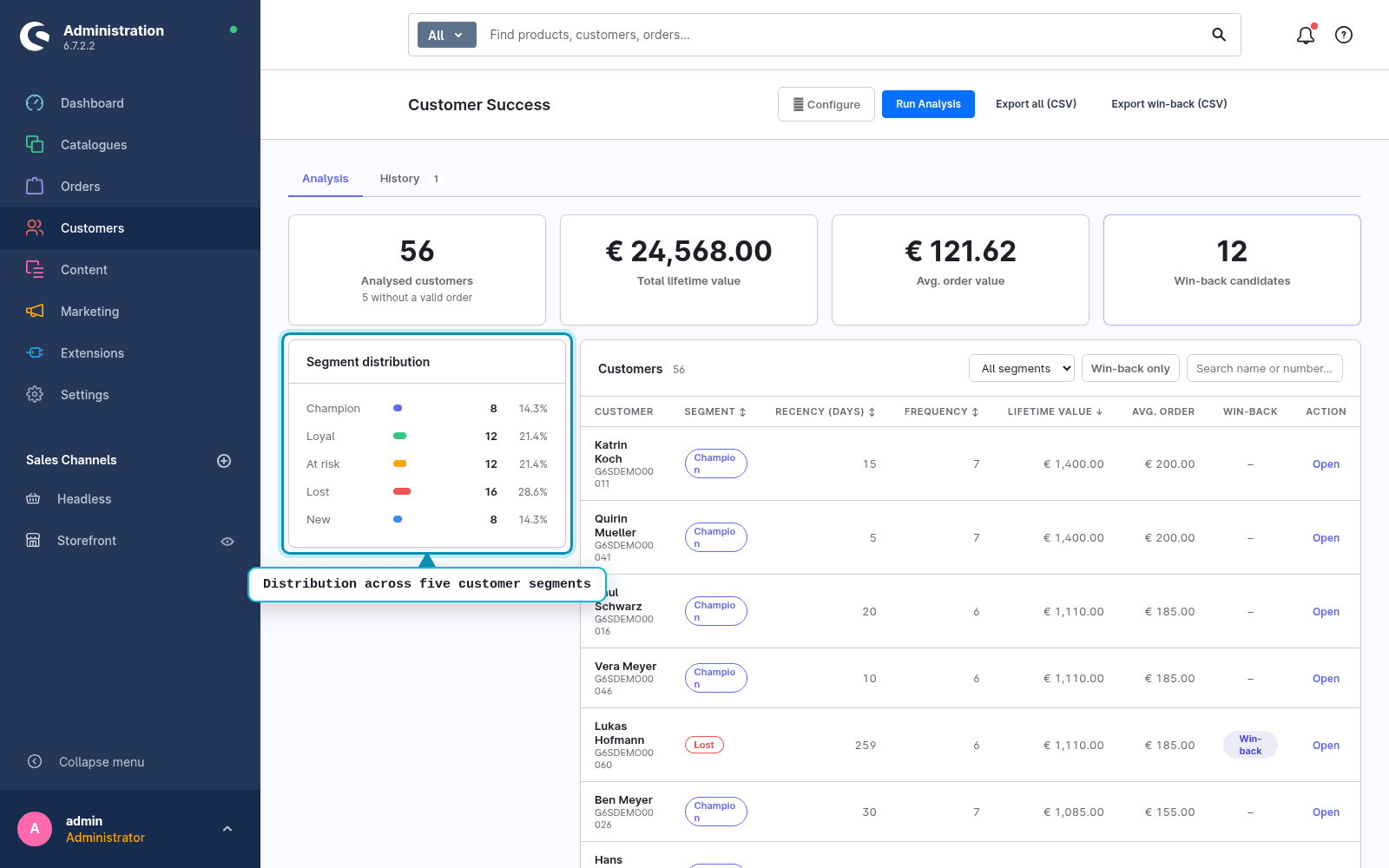
Our module Customer Value & Loyalty (yes, ours, hence this note) computes RFM from the order history and assigns every registered customer to one of five segments: New, Champion, Loyal, At risk, Lost. It counts either paid orders only or all non-cancelled orders. Whether orders get completed plays no role.
On top come lifetime value and average order value per customer, and a list of win-back candidates, by default customers with at least two orders and a 180-day gap, both adjustable. The list goes to your newsletter or CRM system as CSV. The module only reads, computes entirely inside the shop and sends no data outside.
Which option for which case?
- Voucher or flow for a customer group: the rule builder, provided orders get completed
- One-off analysis before a win-back campaign: order export and spreadsheet
- Database access: a read-only SQL query over the orders
- An ongoing overview with segments, ranking and a win-back list: the module
Know who is leaving
Customer Value & Loyalty computes RFM from your order history, regardless of whether orders get completed. Live in the Shopware Store. And if you want to know how healthy your shop is overall: the free Shop-Check tests SEO, broken links and AI visibility in 30 seconds.
FAQ
Frequently asked questions
What is an RFM analysis?
A way of grouping customers by three values from the order history: how long ago they last ordered (recency), how often they ordered (frequency) and how much revenue they generated (monetary). Segments such as loyal, at-risk or lost customers follow from that.
Why does Shopware show zero for customers who have orders?
Because Shopware computes order count, revenue and last order on the customer only from orders in the “Completed” state. Orders that stay on “Open” or “In progress” do not count there, even if they are paid and shipped.
Does this affect the rule conditions too?
Yes. The conditions for the number of orders, the days since the last order and the total amount read exactly these customer values. Without completed orders they match nothing.
How do I set orders to completed automatically?
With the Flow Builder. A flow can change the order state, triggered for example by the delivery state “Shipped”. After that, Shopware recomputes the customer values on every state change.
Does the module send win-back e-mails?
No. It delivers the candidates as a list with CSV export. You handle sending in your existing newsletter or CRM system.